For decades, the personal computer has been defined by a growing separation of components. We have the tower, the monitor, and the peripherals, each connected by a spiderweb of cables. Even in the world of laptops, the screen and the input deck are inseparable halves of a clamshell. However, there was once a time—during the golden age of the 1980s—when the computer was the keyboard. Machines like the Commodore 64, the ZX Spectrum, and the Apple II integrated the logic board, the processor, and the interface into a single, tactile unit. Today, that legacy is being reborn with a modern, professional twist. We are looking at the HP EliteBoard G1a, a device that marks the return of the keyboard PC to the enterprise and enthusiast markets.
The Evolution of the All-in-One Input Device
The concept of the keyboard PC didn’t die because it was a bad idea; it faded because the thermal demands of early high-performance processors required large cooling fans and bulky power supplies that simply couldn’t fit beneath a typing deck. As silicon became more efficient and mobile processing power skyrocketed, the form factor became viable once again. While the Raspberry Pi 400 flirted with this idea for the hobbyist market, the HP EliteBoard G1a is the first serious attempt by a major manufacturer to bring this design into the high-end productivity space.
The appeal of a keyboard PC is rooted in its minimalism. By eliminating the traditional “black box” desktop or the bulk of a laptop hinge, the EliteBoard G1a offers a “zero-footprint” solution. You simply plug it into a monitor, and your entire workstation is live. It caters to a specific breed of professional: the minimalist, the remote worker who moves between various docking stations, and the digital native who prizes tactile feedback over portability.
Design and Build Quality: A Masterclass in Aluminum
At first glance, the EliteBoard G1a looks like a high-end mechanical keyboard. HP has utilized its Elite-series design language, featuring a chassis carved from a single block of CNC-machined magnesium-aluminum alloy. It is surprisingly heavy, which is a benefit in this category. The weight ensures that the device doesn’t slide around your desk during intense typing sessions, and it provides a heat sink for the internals.
The aesthetic is professional and understated. There are no flashy RGB lights or “gamer” accents. Instead, you get a bead-blasted silver finish and a slim profile that tapers slightly toward the user. Along the top edge, a discreet strip of dark glass hides the cooling vents and the wireless antennas. It feels like a premium piece of office equipment, sitting somewhere between a luxury typewriter and a piece of high-tech lab gear.
Under the Hood: Specifications and Performance
One might assume that fitting a computer inside a keyboard would result in mediocre performance, but HP has managed to pack impressive hardware into the G1a. By utilizing AMD’s Ryzen Embedded architecture, they have achieved a balance of thermal efficiency and raw speed. Our review unit came equipped with the following specifications:
- Processor: AMD Ryzen 7 7840U (8 cores, 16 threads, up to 5.1GHz)
- Graphics: Integrated AMD Radeon 780M
- Memory: 32GB LPDDR5x (Soldered)
- Storage: 1TB NVMe Gen4 SSD (User-replaceable via a bottom hatch)
- Connectivity: Wi-Fi 6E, Bluetooth 5.3
In our testing, the EliteBoard G1a handled multitasking with ease. Whether it was running twenty Chrome tabs, a Slack instance, and a Zoom call simultaneously, or compiling code in VS Code, the system remained snappy. The 780M integrated graphics are even capable of light creative work, such as 4K video editing in DaVinci Resolve or running modern titles at 1080p with modest settings. However, the real star is the thermal management. A vapor chamber cooling system ensures that the heat is dissipated away from the keys, meaning your fingers never feel the warmth of the CPU even under load.
The Typing Experience: Mechanical Mastery
If you are going to force a user to use a specific keyboard, that keyboard better be exceptional. HP understood this and collaborated with Cherry to integrate their MX Ultra Low Profile (ULP) tactile switches. These switches offer the satisfying “click” and tactile bump of a traditional mechanical keyboard but with a much shorter travel distance, allowing for the slim profile of the G1a.
Typing on the EliteBoard G1a is a revelation compared to the mushy membrane keys found on most office laptops. The PBT double-shot keycaps have a slight texture that prevents finger slips, and the layout is a standard 75% configuration, omitting the number pad to keep the footprint compact while retaining the essential function row and arrow keys. For writers, programmers, and anyone who spends eight hours a day typing, this hardware choice alone justifies the device’s existence.
Connectivity: The Power of a Single Cable
One of the primary advantages of a keyboard PC is the reduction of cable clutter. HP has designed the G1a to be a hub for your entire workspace. The rear I/O (Input/Output) panel is surprisingly robust for a device of this size:
- 2x USB-C (USB4): Supporting 40Gbps data, Power Delivery, and DisplayPort 1.4 alt mode.
- 1x HDMI 2.1: For direct connection to 4K monitors.
- 2x USB-A 3.2 Gen 2: For legacy peripherals or thumb drives.
- 1x 2.5Gb Ethernet port: For high-speed, stable wired networking.
- 3.5mm Combo Jack: For high-impedance headphones.
The most impressive feature is the One-Cable Setup. If you have a monitor that supports USB-C Power Delivery (65W or higher), a single cable from the monitor to the EliteBoard G1a provides power to the PC while simultaneously sending the video signal to the screen. This creates a remarkably clean desk environment. Additionally, HP has included a built-in NFC sensor on the right side of the deck, allowing for secure enterprise logins with a tap of a security badge.
Target Audience: Who is the EliteBoard For?
The HP EliteBoard G1a is a niche product, but its niche is growing. It isn’t trying to replace the laptop for the traveler who works on airplanes, nor is it trying to replace the workstation tower for the 3D animator. Instead, it targets several key demographics:
The “Hot-Desking” Professional: In the modern hybrid office, many workers do not have a permanent desk. Carrying a thin, light keyboard that contains your entire OS and files allows you to plug into any monitor in the office and be ready to work in seconds. It is much more portable than a laptop while offering a vastly superior typing experience.
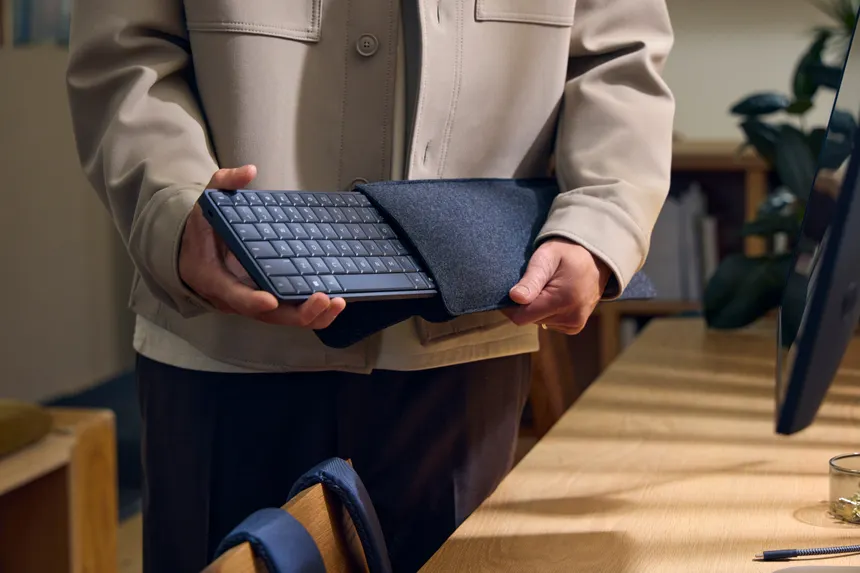
The Minimalist Home Officer: For those who live in small apartments or want their workspace to disappear at the end of the day, the EliteBoard G1a is perfect. When work is done, you can simply tuck the keyboard into a drawer, and your “office” is gone.
Security-Conscious Industries: Because the device is the PC, it is easier to secure than a tower sitting under a desk. In sensitive environments, an employee can unplug their “computer” and lock it in a secure safe at night, ensuring that no data is left unattended.
Software and Ecosystem
HP ships the EliteBoard G1a with Windows 11 Pro, though it is fully compatible with various Linux distributions, making it a dream machine for open-source developers. HP has also included its “Wolf Security” suite, which provides hardware-enforced protection. One unique software addition is the HP Command Center, which allows users to toggle between different thermal profiles: “Quiet” for focused writing, “Balanced” for daily use, and “Performance” for when you need to crunch through a heavy spreadsheet or video render.
Interestingly, the G1a also features a discrete hardware toggle for the microphone and a physical privacy shutter for the (optional) external webcam that comes bundled with the deluxe kit. This focus on privacy is a hallmark of the Elite brand and is well-represented here.
Potential Drawbacks: The Price of Integration
No device is without its compromises. The most obvious issue with a keyboard PC is that if the keyboard fails, the entire computer is essentially out of commission until repaired. Unlike a desktop where you can just swap out a $20 peripheral, the HP EliteBoard G1a is an integrated system. While the Cherry switches are rated for 50 million keystrokes, a spilled cup of coffee could be a catastrophic event.
Furthermore, the lack of an internal battery means this is not a portable device in the way a laptop is. You must be tethered to a power source and a display. This limits its utility to environments where screens are readily available. Finally, there is the price. Starting at $1,299, the G1a is a premium investment. You are paying for the engineering required to shrink a high-performance PC into a chassis less than an inch thick.
Conclusion: A Bold Step Forward by Looking Back
The HP EliteBoard G1a is more than just a nostalgic callback to the days of the Commodore 64. It is a sophisticated, powerful, and beautifully designed solution for a world where our workspaces are becoming increasingly fluid. By focusing on the human-to-machine interface—the keyboard—HP has created a device that prioritizes the comfort of the user without sacrificing the performance required by modern workflows.
While it may remain a boutique choice for now, the G1a proves that the keyboard PC form factor has a place in the 21st century. It challenges our assumptions about what a computer “should” look like and offers a compelling alternative to the cluttered desks of the past. If you value tactile precision, minimalist design, and the freedom to carry your entire workstation in a sleeve under your arm, the EliteBoard G1a is the return to form we have been waiting for.
The Final Verdict: The EliteBoard G1a is a specialized tool that excels at its specific purpose. It isn’t for everyone, but for those who value the synergy of input and processing, it is currently in a class of its own. It represents a bold, successful experiment in rethinking the architecture of the modern workspace.